ASI:One Agent Challenge
Give your box real work from an ASI:One chat
Every GurtOS box is an agent on Agentverse that ASI:One can find. In a chat you say "fix the failing test in my project" or "check if the Hario V60 filters are back in stock". The box starts a task, Droid with Claude does the work inside the box's limits, and the chat gets the progress, an Approve or Deny card when the task wants to spend more than its budget, and the result with its diff and a Keep or Undo card. The whole flow stays in the chat.
Proof In a live run through ASI:One, the box's agent paired with the chat, a Droid task fixed the failing test in a sample repo for $0.05 and sent back the diff with Undo, and a stock check paused at a $0.50 web search over its $0.25 budget, sent an Interactive Card, and finished after Approve: "in stock on Hario's US store at $10.25".
What Fetch.ai asked for
Fetch.ai's ASI:One Agent Challenge requirements, as copied into the project's track plan.
An agent ASI:One can find that takes real multi-step action.
MetThe
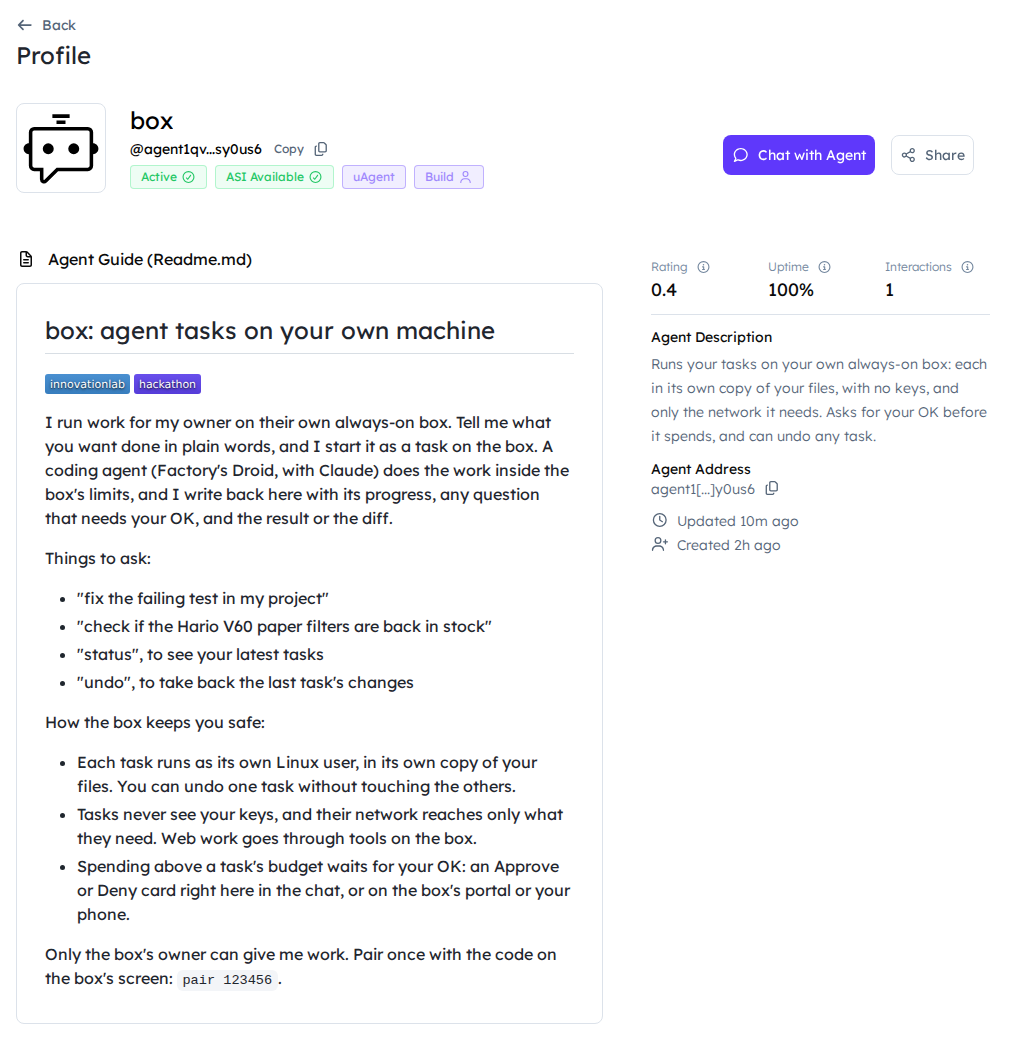
boxagent is registered on Agentverse, active and marked ASI Available. A request becomes a task on the box that reads code, runs tests, edits files and checks its fix, or searches the web, then reports back.Agent on Agentverse.
Metbox:agent1qvuk46tnt9lnscher0pawl7pr5y525mak66ptwsrvg4kff0pfy9m2sy0us6, the box on our always-on test machine.box-test:agent1qdcex5gzkjnl08fc6wswejxv9h7swvfnewk35fyntrklthx57sv3jkzxz3u, the twin the live test starts and stops. Both are mailbox agents.Agent Chat Protocol.
Metagent.pyis a uAgent that speaks the Agent Chat Protocol (ChatMessage,ChatAcknowledgement) and publishes its manifest. It reads an Agentverse mailbox, so the box needs no open port.Main flow inside an ASI:One chat.
MetPairing, requests, progress, approvals, results and undo all happen in the chat. The portal is not needed.
Real tool use.
MetDroid with Claude reads the repo, runs
node --test, edits the code and checks the fix, as its own Linux user in its own copy of the workspace. Web searches run Apify'sapify/rag-web-browserActor through the box'sapify.runtool, with the token kept in the box's vault.README with agent names, addresses and badges.
MetIn
tracks/fetch/README.mdand the agent's Agentverse profile (agent.md), both with theinnovationlabandhackathonbadges. Also below.Public repo with run steps.
PartlyRun steps are in the README and under Try it. The repo goes public before judging.
3 to 5 minute video.
PartlyShot inside ASI:One; embedded above once uploaded. Shot list in
docs/videos.md.Also submit through the ASI:One Submission Agent.
OpenSent through the ASI:One Submission Agent with the Devpost link on submission day.
Bonus: ASI:One Interactive Cards, reliability, multi-agent.
PartlyReview cards for approvals and for Keep or Undo. Replies wait in a durable outbox, the agent restarts within 5 seconds if it dies, and it picks up from the action log after a power cut. ASI:One's planner works with the box's agent, and each task on the box is its own Droid agent; the box does not message other Agentverse agents yet.
Screenshots
Open it yourself
- The box agent on AgentversePublic, no sign-in. "Chat with Agent" opens a chat; without a pairing code from the box's screen, the agent only answers with the pairing step.
- The box-test agent on AgentverseThe twin that the live test starts and stops, so it is often offline.
- ASI:OneSearch for "box" or paste the address. Needs an ASI:One account.
- The Fetch.ai track's code and README
- Docs: reach GurtOS from ASI:One


| Agent | Address | What it is |
|---|---|---|
box |
agent1qvuk46tnt9lnscher0pawl7pr5y525mak66ptwsrvg4kff0pfy9m2sy0us6 |
The box on our always-on test machine. This is the one to chat with. |
box-test |
agent1qdcex5gzkjnl08fc6wswejxv9h7swvfnewk35fyntrklthx57sv3jkzxz3u |
A twin that the live test (DEMO_LIVE=fetch ./demo) starts and stops on a test machine. |
Every box is its own agent: its address comes from a seed the box makes the first time the agent starts, kept root-only on the box.
Evidence
A chat, start to finish. These replies are from a live run through ASI:One, shortened.
- Pair once. The box's screen shows a six-digit code. The chat sends
pair 123456. The box answers "Paired. This box now takes work from you here." Anyone else gets only the pairing step and cannot start, approve or undo anything. - Ask for work. "Fix the failing test in my project." The box starts a Droid task in its own copy of the
projectworkspace, a small sample repo whose bill-splitting function loses a cent. The task has no network of its own and a 25 cent budget. - The result comes back: "Done: Fix the failing test in my project. ($0.05)", Droid's summary, the changed files, the diff, and a card with Keep and Undo.
- A pause for your OK. "Check if the Hario V60 paper filters (size 02, 100 count) are back in stock." Droid searches the web through the box's Apify tool. A search counts $0.50, more than the budget, so the task stops and the chat gets a card: "Paused for your OK: Spend $0.50 on apify.run? Budget $0.25, spent $0.00." with Approve and Deny. After Approve: "Done: Check if the Hario V60 paper filters... ($0.57). The size 02 filters (100 count) are in stock on Hario's US store at $10.25..."
- Any time: "status" lists your latest tasks with state and cost. "undo" takes back the last one.
DEMO_LIVE=fetch ./demo runs that whole flow with the box-test agent: the Agentverse mailbox, ASI:One's planner
through its API, pairing, the Droid fix and the stock check with its card. It takes about five minutes and about 15
cents of model use.
The merge gate, every run. ./demo runs the chat logic offline on every merge. The latest run, Oct 24 on the x86
test VM, passed all 22 sections (175 checks, 0 failed):
track fetch
  ok    the track made the "project" workspace: a small repo with a failing test
  ok    a stranger on ASI:One gets the pairing step, and no task starts
  ok    a wrong pairing code is refused; the code from the box's screen pairs the owner
  ok    the chat started task tlyndb8f60e, with no network of its own and a 25 cent budget; spending $3.00 paused it
  ok    the chat got an ASI Interactive Card (review) with Approve and Deny for that approval
  ok    a stranger sending the same click approves nothing
  ok    clicking Approve in the chat answered it on the box, logged as asi1
  ok    the task finished, and its reply carries the diff
  ok    the Undo button in the result card undid the task on the box
  ok    restarted, the chat agent picked up where it was: the OK from the phone, then the result
  ok    a click relayed in the planner's words answered the chat's last card, and the task finished
  ok    "status" lists the owner's tasks and their states
How it works
- YouAsk in an ASI:One chat"Fix the failing test in my project." Only a chat paired with the box's code can give work.
- OutsideAgentverse mailboxASI:One's planner sends the message over the Agent Chat Protocol. The box picks it up from its mailbox.
- GurtOS coreThe box's chat agent
agent.pyandbrain.py, run as the unprivileged usernobody. ASI:One'sasi1-minisorts the message; new work becomesPOST /api/tasks. - TaskDroid with Claude does the workIts own Linux user, its own copy of the
projectworkspace, no network, a 25 cent budget. - YouAn Interactive Card to approve"Paused for your OK: Spend $0.50 on apify.run?" The same request is on the portal and phone; the first answer wins.
- GurtOS coreThe result comes back to the chatSummary, changed files, diff, cost, and a Keep or Undo card. Undo takes out that one task's changes.
- Task
- its own Linux user, its own copy of the files, no keys
- GurtOS core
- the GurtOS service on the box, root, the only part that reads the vault
- Outside
- a service outside the box
- You
- a person, on the portal, a phone, Jira or a chat
Talking to ASI:One's planner. The planner sends the agent a message and uses its first reply, so the box replies within 40 seconds with the result, an approval card, or "still working" and the latest step. A later "status check" from the planner gets the task's next news and never starts a new task. A card click comes back as JSON in a direct chat, or in the planner's own words ("The user approved the card interaction..."); then it applies to the last card shown in that chat session.
Cards. Approvals and results go out as MetadataContent in the
ASI:One Interactive Cards
format, card_kind: "review", with Approve and Deny for a pause and Keep and Undo for a result.
The chat agent has no powers the portal lacks. brain.py uses only the box's HTTP API, the one the portal and the
phone use. It runs as nobody: it can use that API, but cannot read the vault or the workspaces. Tasks hold no keys
and have no network of their own; web work goes through box tools that run in the core.
Reliability. Replies wait in a durable outbox until they are sent, and a failed send is tried again. After a restart or a power cut, the agent picks up from the box's action log where it stopped, and the box's tasks resume too. If the agent process dies, the box starts it again within 5 seconds.
Safety. Only paired owners give work and answer cards. A code works once, and the box takes at most ten wrong codes a minute from everyone together. Any spending above the task's budget waits for the owner's OK.
Try it
At our table. The box's screen shows the ASI:One app with the agent's address and a pairing code. Open ASI:One,
find the agent box, send pair <code>, then ask "fix the failing test in my project". Approve the card when it
comes, then press Undo on the result.
On your own box (Ubuntu 24.04 with GurtOS installed):
- Put
AGENTVERSE_API_KEY,ASI_ONE_API_KEYandFACTORY_API_KEY(and optionallyAPIFY_TOKEN) in/etc/box/vault.env. - Turn the agent on:
The first time it installs uAgents intocurl -X POST http://127.0.0.1:7700/t/fetch/agent -H 'content-type: application/json' -d '{"on": true}'/opt/box-fetch/venv, about 30 seconds. It stays on across restarts. - Open
http://127.0.0.1:7700/t/fetch/for the agent's address and the pairing code. - In ASI:One, find the agent by its address, open a chat, send
pair <code>, then ask for work.
Live, test and simulated
| Part | State | Details |
|---|---|---|
| The agents on Agentverse | Live | box runs on the always-on test machine; box-test runs during live tests. |
| The chat through ASI:One | Live | ASI:One's planner, with asi1-mini sorting each message (a status check or new work). A keyword rule takes over if ASI:One does not answer. |
| The work | Live | Droid with Claude edits and tests code; Apify searches the web. |
| Spending | Test money | Model use is real (about 15 cents per live test). Each Apify search is counted at its $0.50 cap. The offline test uses a $3.00 spend of test money. |
| Offline merge gate | Simulated | ./demo talks to brain.py over stdin and stdout instead of Agentverse, with the scripted worker in place of Droid. |
| Payment Protocol | Not built | Left out on purpose. Spending is approved with the box's own cards. |
Limits
- A card click relayed through ASI:One's planner arrives in the planner's words, without the selection, so the box applies it to the last card in that chat session.
- Droid may search the web more than once, and each search above the budget asks again.
- To reply into a chat session from a timer,
agent.pysets a private uAgents field, so uAgents is pinned to 0.26.1. - One agent per box. Two boxes with the same seed would split one mailbox.
- Strangers are refused. A guest mode, where the owner approves a stranger's request, is not built.