A personal agent that remembers you
The box remembers what is in your photos, files and past tasks
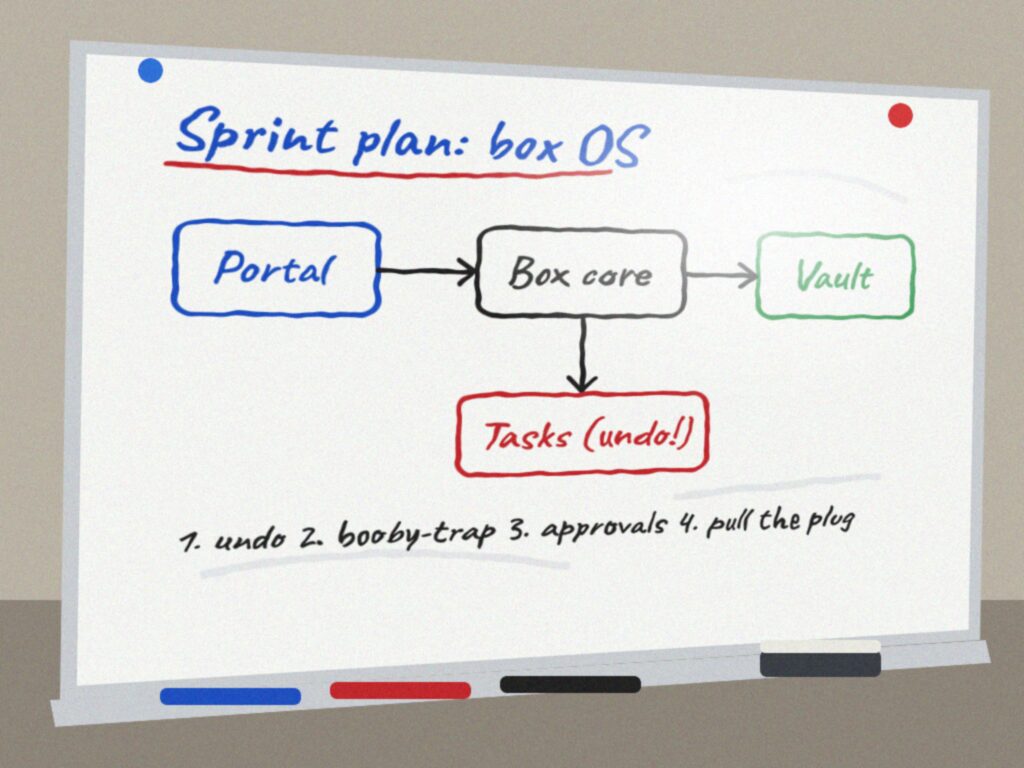
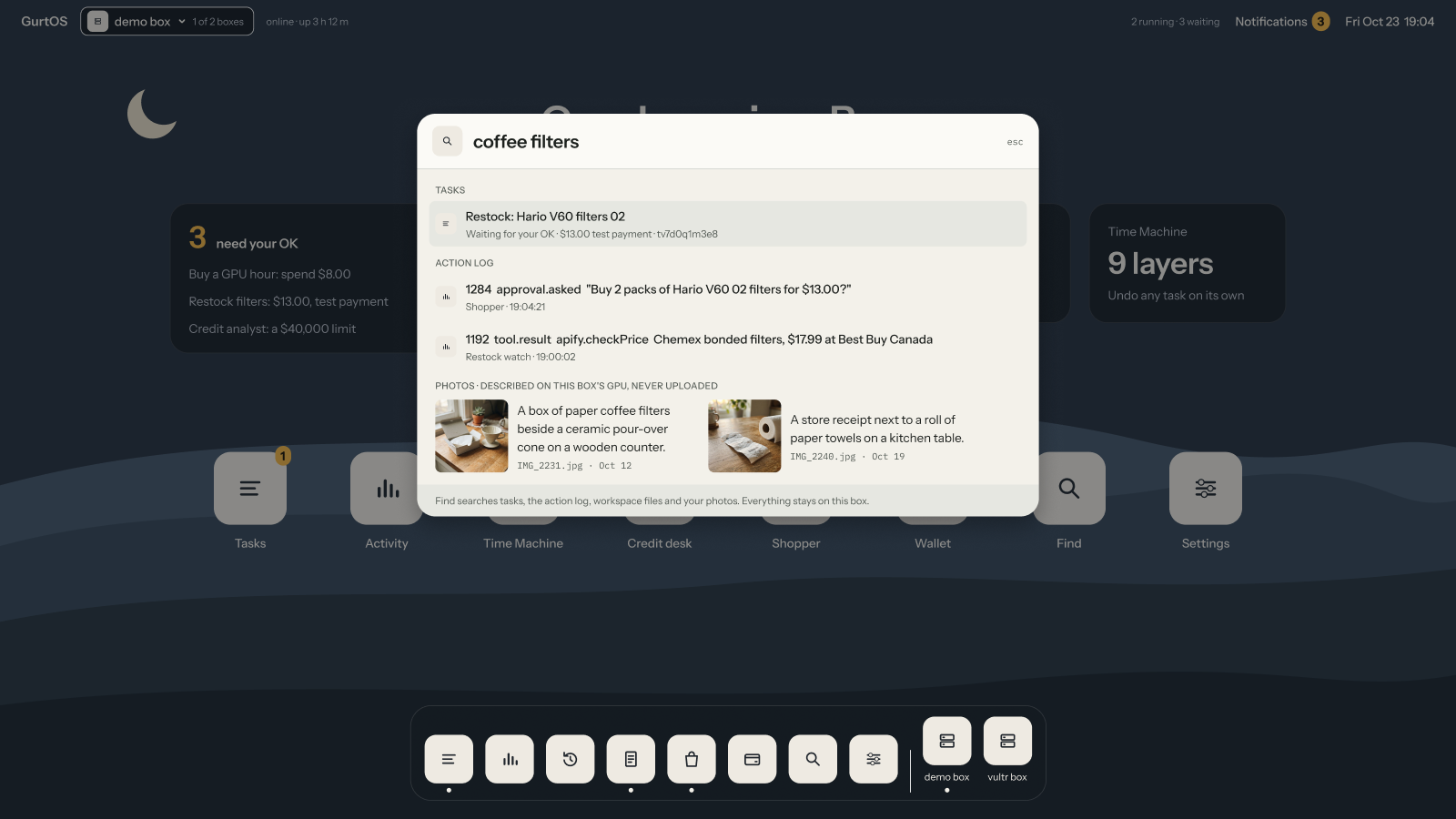
Say "find the whiteboard photo" and the box answers photos/IMG_2041.jpg, a file whose name says nothing about a whiteboard. A vision model described the photo when it arrived, and Moss indexes that description together with every text file and finished task on the box. Agents search the same index through a box tool, with no network and no keys of their own.
Proof A search through the box takes a median of 3.1 ms on both test VMs (ARM64 and x86), under 1 ms of it inside Moss, because Moss runs in the box's own memory. In every merge-gate run, an agent with no network asks find.search through the broker and gets the same whiteboard photo; undo a task and its files leave the index while the photos stay.
What Moss asked for
From Moss's track description, as copied into the project's track plan. Moss published no detailed criteria.
Fit one of their three examples.
MetThe second: a personal agent that remembers you, works across your apps and handles everyday tasks on its own. GurtOS is a computer where agents do everyday work (shopping, paperwork, code), and through Moss the owner and every agent can find what any of them did, filed or wrote, by meaning.
A voice agent, a personal agent that works across your apps, or a social post.
MetOne index across every app's workspace: photos (described by a vision model), text files, and the history of every task the box ran. The owner searches through the box's API (
GET /t/find/search, with a paired token from off the box); agents search with thefind.searchtool.
Screenshots
Open it yourself
- The track README, with the latency table
- The index and the describer, tracks/find/find.ts
- Docs: search your files with /findMoss's cloud index has no public view, so the evidence here is the merge-gate output and the latency measurements.
Evidence
From the Oct 24 merge-gate run on the x86 test VM (22 sections, 175 checks, 0 failed). This is the offline path, with recorded descriptions and a word index in Moss's place:
track find
  ok    the box loaded the find.search tool
  ok    the unit tests pass against a stub vision model
  ok    the box described the four test photos in the photos workspace
  ok    "find the whiteboard photo" -> photos/IMG_2041.jpg, described by gemma4 (recorded): "This is a whiteboard diagram illustrating a "Sprint plan: box OS" work..."
  ok    offline run: the word index stood in for Moss
  ok    the portal can show the photo it found (GET /t/find/file)
  ok    an agent asked find.search and got the same photo, through the broker
  ok    "Tahoe packing list" -> find-notes/tahoe.md, the file a task just wrote
  ok    "Tahoe weekend" -> task tlynjlr8f5f, "Task "Plan the Tahoe weekend" (done): write tahoe....": task history is searchable
  ok    a symlink to the vault is neither indexed nor served, and no path leaves the workspaces
  ok    undo took the task's note back out of /find; the photos stayed
Measured with Moss live, on Oct 23, with DEMO_LIVE=find ./demo on both test VMs and a direct test of the SDK:
| Step | Where | Time |
|---|---|---|
| A search through the box, the demo box's whole index | ARM64 and x86 test VMs | median 3.1 ms wall time; under 1 ms inside Moss |
| A Moss query, SDK alone, 5 documents | x86 test VM | 2 to 4 ms |
| Add a document to the index | x86 test VM | 6 ms for one, 28 ms for four |
| Open the Moss session (loads the embedding model) | x86 test VM | 3.8 s, once at boot |
| Push the index to Moss's cloud | x86 test VM | 1.6 s, in the background |
| Describe a photo with gemma4 on the laptop's GPU | ARM64 test VM | 1.1 to 2.8 s with the model loaded |
| Describe four photos with Claude in one Droid task | x86 test VM | 34 to 36 s, about 9 s a photo |
Describing is slow and happens once per photo, when it arrives. Searching is fast because Moss answers from the box's own memory.
How it works
- GurtOS coreA photo or file arrivesIn any workspace, or written by a task. Rescans run at boot, after every task, and every minute.
- OutsideA vision model describes itgemma4 in Ollama on the same laptop's GPU, or Claude in a sandboxed Droid task as the backup.
- GurtOS coreMoss indexes it on the boxA session index with
moss-minilm, in the box's memory. Metadata says photo, file or task. - OutsideMoss's cloud keeps a copyText only, a few seconds after a change. Never a photo.
- TaskAn agent asks find.searchThrough the broker. No network, no Moss key.
- YouYou search too
GET /t/find/searchon the box's API, and/t/find/filefor the photo it found. There is no /find window in the portal yet.
- Task
- its own Linux user, its own copy of the files, no keys
- GurtOS core
- the GurtOS service on the box, root, the only part that reads the vault
- Outside
- a service outside the box
- You
- a person, on the portal, a phone, Jira or a chat
What goes in. Photos (.jpg, .png, .webp, .gif) by their description; text files up to 200 KB by path and
their first 2,000 characters; and every task when it finishes, fails or is undone, by title, state and Droid's final
message. It reads each workspace as it is now: the base files plus every finished task's changes. A file is read again
only when its size or time changes, and docs.json keeps every entry, so a restart rebuilds the index in
milliseconds without describing anything again.
Which model describes. One function sends the photo to any OpenAI-compatible chat API. The box tries models in order and the first that answers wins; a model that fails is skipped for 5 minutes. The prompt asks for the kind of thing first (a whiteboard, a receipt, a product), then details and readable text, then 8 keywords. Without that, gemma4 called the whiteboard "a presentation slide".
When Moss is out of reach. If Moss cannot open at boot, search falls back to word matching and tries Moss again every minute. Each result says which index answered.
Agents use it safely. A task lists find.search in its tools and calls it through its broker. It holds no Moss
key. Symlinks are skipped, so a task cannot point the index at the vault, and the file route serves only paths inside
a workspace.
{ "query": "find the whiteboard photo", "kind": "photo", "topK": 3 }Try it
- Put
MOSS_PROJECT_IDandMOSS_PROJECT_KEYin the box's vault,/etc/box/vault.env. Photos are described by the first model inMODELS(tracks/find/find.ts) that answers: gemma4 in Ollama, then Vultr's hosted model, then Claude through Droid with the box's Factory key. Edit that list to keep photos on your own GPU. - Copy photos into any workspace. The track makes a
photosworkspace with the four test photos on first boot. - Search:
curl -s '127.0.0.1:7700/t/find/search?q=find+the+whiteboard+photo&kind=photo'. - Or give a task the tool:
"tools": ["find.search"], and ask it to find something.
Live, test and simulated
| Part | State | Details |
|---|---|---|
| Moss index and search | Live | @moss-js/moss 1.21, session index on the box, pushed to the project's cloud index. DEMO_LIVE=find ./demo runs it. |
| Photo descriptions | Live | gemma4 in Ollama on the laptop VM; Claude (claude-sonnet-4-6) through a Droid task on the x86 VM. |
| Vultr's hosted vision model | Not built | Untested: the Vultr account has no Serverless Inference subscription yet, so the Vultr box uses the Claude backup. |
| Offline merge gate | Simulated | Plain ./demo uses descriptions gemma4 wrote earlier and a word-match index in place of Moss, so every merge runs without network. |
| The test photos | Simulated | Four images we rendered (make-photos.sh): a whiteboard, a receipt, a battery pack and a bar chart. No personal photos. |
Limits
- Vultr's vision model is untested. The account needs a paid Serverless Inference subscription first.
- Any task given
find.searchcan search every workspace, not only its own. A photo with text in it can carry that text into an agent's context as data. - Only the first 2,000 characters of a text file are indexed. Long files need chunking.
- Photos go to the model at full size. Large phone photos are slower to describe.
- A failed Claude description is not retried until the box restarts, so a broken backup cannot start tasks in a loop.